Skip to content
Apivoo
Sign up

The next step for every hive.

Log inspections, treatments and harvests on your phone, even without signal. Apivoo keeps everything per hive and tells you what each one needs.

Free during early access · no card · no hive limit

C-07Hillside Farm
Last inspection
36 days ago
Varroa
1.2%
Queen
2025 · marked blue
Strength
3/5
Stores
low
Inspection overdueLimit: 21 days
Low honey storesAt the last inspection

With ten hives you still remember. With thirty, you don't.

  • “When did I last see the queen in hive C-07?”

    The answer was in the notebook. The notebook stayed in the car.

  • “What did I treat with, on what date, and when can I harvest?”

    Without recorded dates, the withdrawal period is a guess.

  • “I get to the apiary and can't recall what I meant to do.”

    What you planned last visit stayed in your head.

A visit to the apiary, from start to finish.

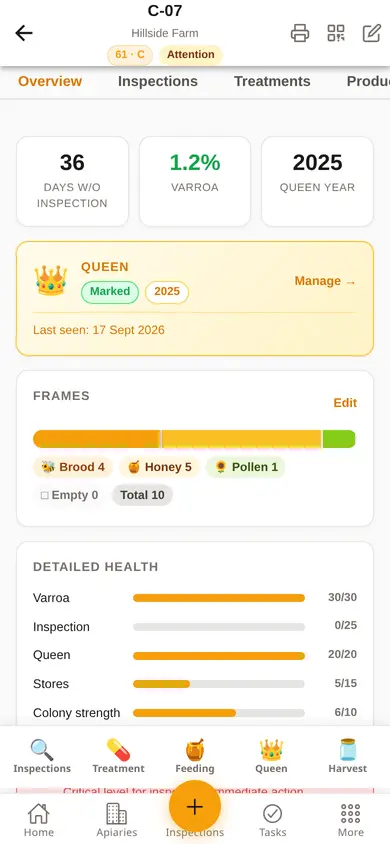
  1. A hive record on a phone: days since the last inspection, varroa, marked queen, frames and detailed health.

    1 · Before

    You know how you left each hive.

    Last inspection, queen status, frames and colony health, in each hive's record. On your computer or your phone, with the same data.

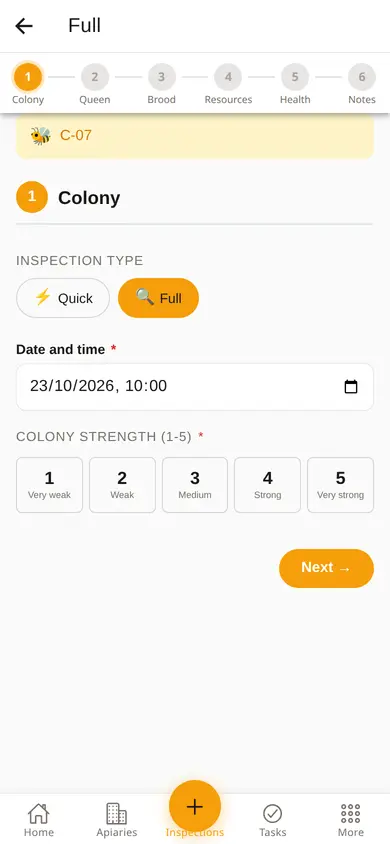
  2. Inspection form on a phone, with the steps colony, queen, brood, resources, health and notes, and colony strength from 1 to 5.

    2 · At the apiary

    You record what you see, step by step.

    Colony strength, queen, brood, stores, health and notes. If the signal drops, the entry is saved and sent when it returns.

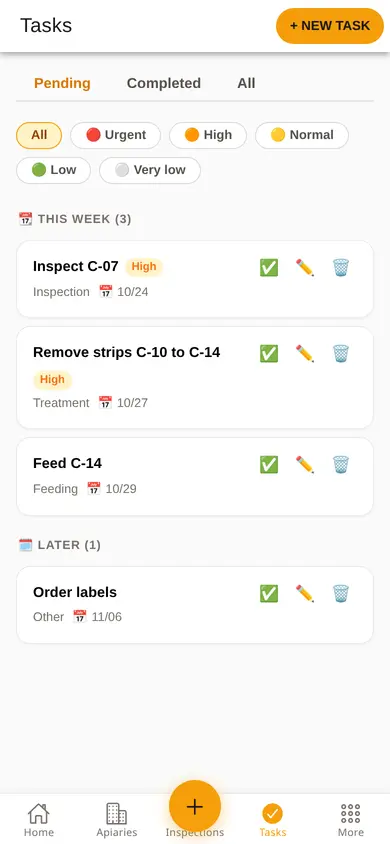
  3. Task list on a phone, with priorities and dates for this week and later.

    3 · After

    The next step is already planned.

    The entry goes into the hive's history and the next tasks get a date and a priority.

The app notices before you do.

From your own records, Apivoo works out what needs attention and shows it on the home screen, hive by hive. No sensors, no hardware, no equipment subscriptions.

Alerts show on the home screen and on a page of their own, hive by hive.

  • C-07 · Hillside FarmNot inspected for 36 daysLimit: 21 days
  • C-12 · River ValleyVarroa at 3.4%Treat above 3%
  • C-03 · Hillside FarmVarroa at 1.8%Watch above 1.5%
  • C-14 · River ValleyWeak colony at the last inspectionStrength 2/5
  • C-09 · River ValleyQueen not seen in two inspectionsCheck for eggs or queen cells
  • C-10 · River ValleyTreatment ends in 4 daysWarning at 5 days

What you do with Apivoo, from the apiary to the year-end summary.

No add-on modules. Every account has access to everything, from the first apiary to the fiftieth.

The withdrawal period, worked out for you.

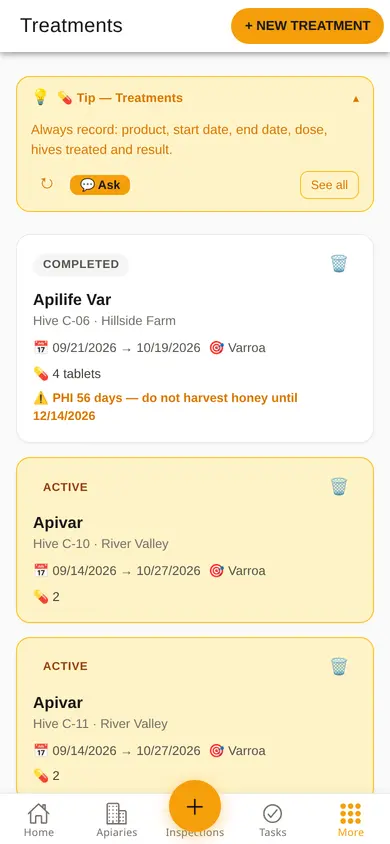
You log the treatment with the product's withdrawal period in days. The app shows straight away until when you must not harvest honey, in the form and then in the treatment list.
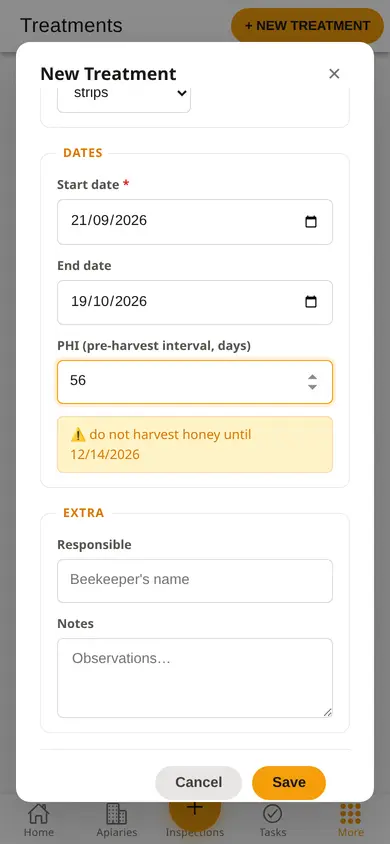
  • Treatment form on a phone: Apilife Var, start and end dates, a 56-day withdrawal period and the warning with the date until which no honey is harvested.
    While logging
  • Treatment list on a phone: the finished Apilife Var shows the 56-day withdrawal period and the date until which no honey is harvested.
    In the list

No signal, and the record stays on your phone.

You save the inspection even without signal, and the bar at the top says how many records are waiting. When the network comes back they upload on their own and the app confirms how many.
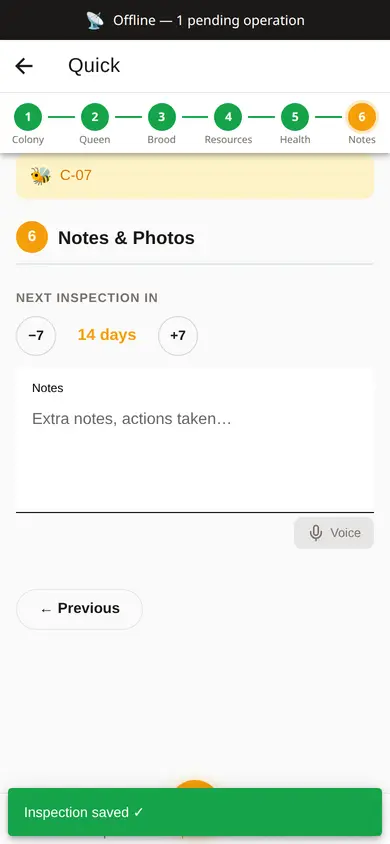
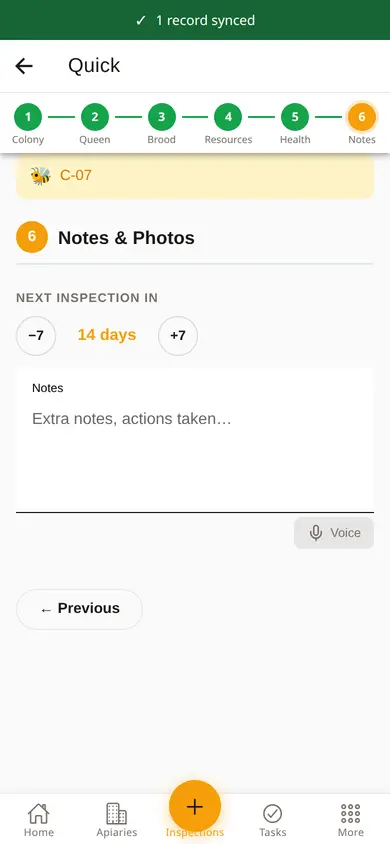
  • Quick inspection of hive C-07 saved without signal: bar at the top with 1 pending operation and an inspection saved notice.
    No signal
  • The same screen after the network returns: the bar at the top confirms 1 record synced.
    Back online
Apivoo inspection form on a phone.

At the apiary, phone in hand

  • Scan the hive's QR code and open its record: last inspection, queen, frames, varroa.
  • Log the inspection step by step: colony strength from 1 to 5, queen seen or not, brood, stores, health and notes.
  • Log the treatment: product, dose and date. The app works out the withdrawal period and the date you can harvest.
  • Log feeding: what, how much and for which hive or apiary.
  • Do the varroa count. Above 1.5% the app flags it; above 3%, treat.
  • Record a new queen, a replacement or its origin.
  • Without signal, everything stays on the phone and syncs when you're back in range.
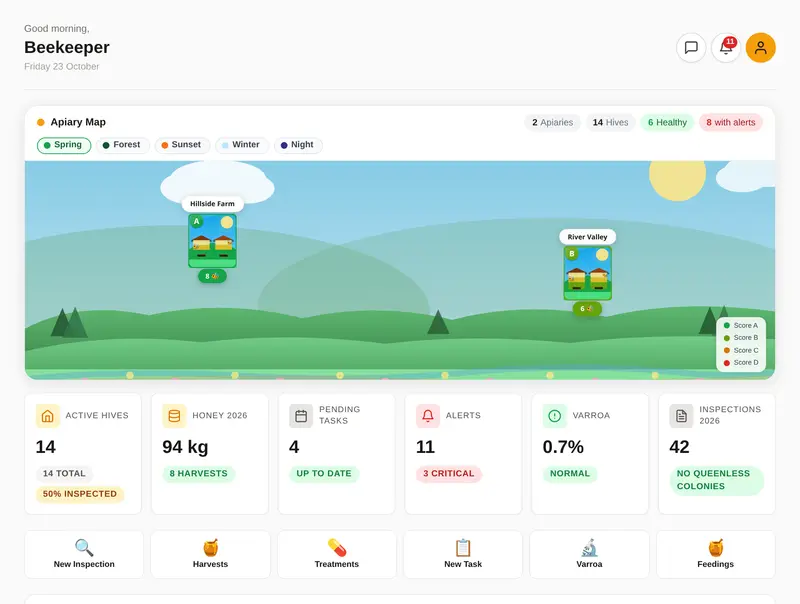
Apivoo home screen on a computer, with the apiary map and indicators.

At home, on the computer

  • See on the home screen which hives need attention, worked out from your records.
  • Plan the next visit's tasks with a date and priority. They can repeat and go to your phone's calendar.
  • Look up each hive's history across the years.
  • See your apiaries on a map, with a 7-day forecast for each.
  • Record expenses and income per apiary.
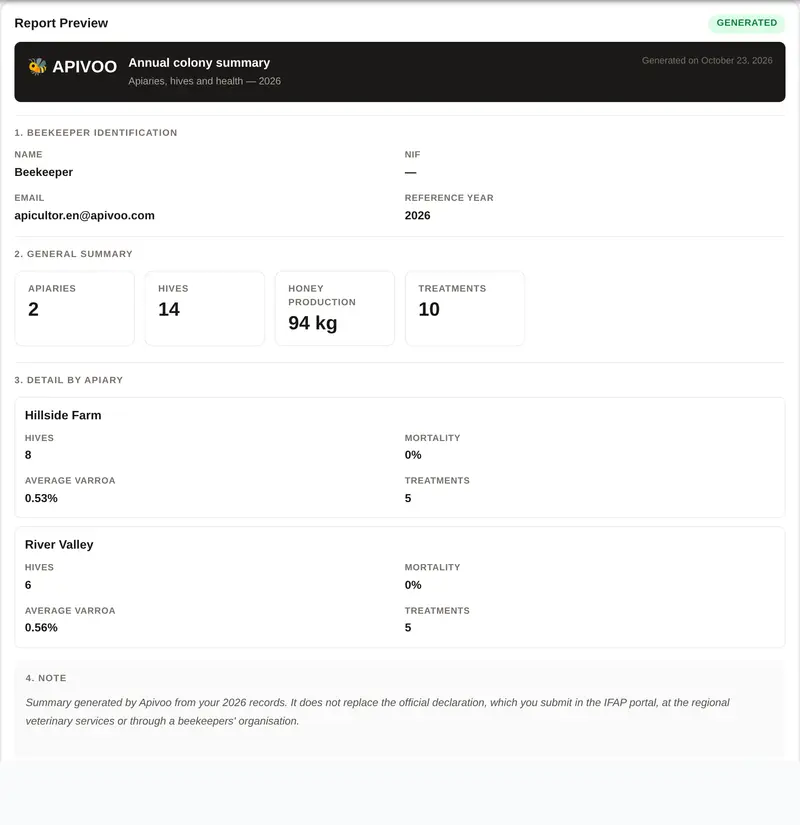
Apivoo annual colony summary: the year's apiaries, hives, honey production and treatments.

Through the season and at year end

  • Record harvests in kilos, per hive and per apiary.
  • Create honey batches with a QR code for traceability.
  • Record moves (migratory beekeeping): from where, to where, when.
  • Keep track of equipment and each hive's components.
  • Get the annual summary as a PDF (Portuguese format, for DGAV).
  • Print the treatment register whenever the authorities ask.
  • Export everything as JSON and CSV whenever you like.
At the apiary, phone in handApivoo inspection form on a phone.
  • Scan the hive's QR code and open its record: last inspection, queen, frames, varroa.
  • Log the inspection step by step: colony strength from 1 to 5, queen seen or not, brood, stores, health and notes.
  • Log the treatment: product, dose and date. The app works out the withdrawal period and the date you can harvest.
  • Log feeding: what, how much and for which hive or apiary.
  • Do the varroa count. Above 1.5% the app flags it; above 3%, treat.
  • Record a new queen, a replacement or its origin.
  • Without signal, everything stays on the phone and syncs when you're back in range.
At home, on the computerApivoo home screen on a computer, with the apiary map and indicators.
  • See on the home screen which hives need attention, worked out from your records.
  • Plan the next visit's tasks with a date and priority. They can repeat and go to your phone's calendar.
  • Look up each hive's history across the years.
  • See your apiaries on a map, with a 7-day forecast for each.
  • Record expenses and income per apiary.
Through the season and at year endApivoo annual colony summary: the year's apiaries, hives, honey production and treatments.
  • Record harvests in kilos, per hive and per apiary.
  • Create honey batches with a QR code for traceability.
  • Record moves (migratory beekeeping): from where, to where, when.
  • Keep track of equipment and each hive's components.
  • Get the annual summary as a PDF (Portuguese format, for DGAV).
  • Print the treatment register whenever the authorities ask.
  • Export everything as JSON and CSV whenever you like.

See all features

From Minho to the Algarve, every apiary in its place.

Every apiary has coordinates, its hives and the local weather. You see the whole picture at a glance and open each one with a tap.

  • Pins with the hives' health grade (A to E), calculated from your inspections.
  • A 7-day forecast for each apiary's location.
  • Migratory beekeeping: every move recorded, with dates and destination.
AMinho12 hivesBTrás-os-Montes8 hivesASerra da Estrela15 hivesCRibatejo6 hivesBAlentejo24 hivesAAlgarve9 hives
Illustrative map with demo apiaries. In the app, your apiaries appear at the coordinates you record.

Notebook, spreadsheet or Apivoo?

The notebook wins on simplicity. The spreadsheet organises. Apivoo does both and warns you too.

Comparison of notebook, spreadsheet and Apivoo on seven criteria.
CriterionNotebookSpreadsheetApivoo
Check and record at the apiary without signalYesNoYes
Each hive's history across the yearsPartlyYesYes
Automatic warnings (inspection, varroa, treatment)NoNoYes
Withdrawal period calculatedNoPartlyYes
The same data on phone and computerNoPartlyYes
PDF reports and exportNoPartlyYes
Safe from rain, loss and corrupted filesNoPartlyYes

Free during early access.

A Pro plan with additional features is planned. The price is published before anything is ever charged, and nothing changes on your account without your decision.

€0

no card and no date set for charging

  • Every feature
  • Unlimited apiaries and hives
  • Phone and computer
  • Export your data whenever you like
  • Email support, from the author
Create free account

Made in Portugal by someone who works the apiary.

Apivoo is made by one person, in Portugal, to be practical. There's no marketing team and no investors. If you write, I answer, usually the same day.

  • Own server in the European Union, with encrypted daily backups.
  • No data sales, no advertising and no AI trained on your records.
  • Encrypted connections (HTTPS) between the app and the server.
  • Export as JSON and CSV at any time.

In private beta since May 2026.

What people ask before creating an account.

Does Apivoo work without internet?

Largely, yes. If you lose connection, inspections, treatments and other records are saved on your device as pending and sent automatically when you're back online. What you'd already viewed stays available to read. Some features, such as varroa photo analysis, need a connection.

Can I export everything if I ever want to leave?

Yes, at any time, as JSON and CSV, with inspections, treatments, harvests and finances. You download it yourself, in the app, without asking anyone.

How is Apivoo different from other apps?

It's available in six languages, works out the withdrawal period of your treatments, produces an annual summary as a PDF (Portuguese format, for DGAV) and warns you based on your own records, with no sensors. Your data stays in the European Union and belongs to you.

See all questions

Start with one hive. Or fifty.

Create your account, add your first apiary and log your first inspection on your phone. It takes less time than a visit to the apiary.

Create free account

Free during early access · no card · no hive limit